Following along? Open the live page
Finmagine — free to explore • premium for full access • no app needed
Multimedia Learning Hub
Stop-loss alerts surface deteriorating positions before you forget to check them
What You Will Master
The Alerts tab is your portfolio's automatic loss-monitoring layer. It evaluates every broker-position pair against a configurable stop-loss threshold and splits results into two sections: positions that have already breached (🔴 Stop-Loss Breached) and those in negative territory but not yet at the threshold (🟡 Approaching). The tab badge shows how many breaches are active so you notice them immediately without opening the tab.
What This Guide Covers:
- How the stop-loss threshold works — default, range, and what it measures
- 🔴 Stop-Loss Breached section — columns, what each means, the Action button
- 🟡 Approaching Stop-Loss section — early warning logic
- Per-broker, per-position evaluation — why the same stock can show in both sections
- The alerts badge — when it appears and what count it shows
- Stop Loss Price in Holdings panel — how it connects to your threshold
- Telegram push delivery — get breach and approaching alerts automatically, without opening the tab
Who This Is For:
- Disciplined loss-limiters — investors with a rule to cut positions below a set loss level
- Multi-broker investors — tracking loss exposure independently per account
- Systematic reviewers — running a weekly check without manually scanning every holding
How the Alerts Tab Works
The Alerts tab compares the current LTP against the net cost basis of each broker-position combination in your portfolio. The descriptor bar at the top shows the current threshold and the evaluation basis:
Every broker account where you hold a stock is evaluated independently. The threshold compares that broker's average cost (not your blended portfolio cost) against the current LTP.
The tab has two sections. The alerts badge on the tab label shows only the breached count — if you see "Alerts 2", two broker-position pairs have crossed your threshold:
| Section | Condition | Counts in badge? | Has Action button? |
|---|---|---|---|
| 🔴 Stop-Loss Breached | P&L% ≤ −threshold% | Yes | Yes |
| 🟡 Approaching Stop-Loss | P&L% < 0% (but > −threshold%) | No | No |
Both sections show the same columns: Stock, Broker, Net Cost, Invested, LTP, P&L%, and Stop Loss (the price level at which the threshold is exactly reached). The Breached section also has an Action button to open the position detail panel.
🔴 Stop-Loss Breached
This section lists every broker-position pair where P&L% has fallen to or below the configured threshold. These are positions that have already crossed your defined loss limit — the action list for your portfolio review.
| Stock | Broker | Net Cost | Invested | LTP | P&L% | Stop Loss | Action |
|---|---|---|---|---|---|---|---|
| WIPRO | Groww | ₹458 | ₹45,800 | ₹412 | −10.0% | ₹435 | Review |
| LALPATHLAB | Zerodha | ₹2,184 | ₹1,09,200 | ₹2,060 | −5.7% | ₹2,075 | Review |
Column Definitions
- Stock — NSE symbol of the holding
- Broker — which broker account this row represents (same stock can have multiple rows for different brokers)
- Net Cost — your true cost basis per share at this broker, after FIFO lot matching and brokerage charges
- Invested — total capital deployed in this stock at this broker (Net Cost × quantity)
- LTP — Last Traded Price in ₹
- P&L% — (LTP − Net Cost) ÷ Net Cost × 100, shown negative for losses
- Stop Loss — Net Cost × (1 − threshold%). At default −5%: Net Cost × 0.95. LTP is at or below this level for rows in this section.
- Action — opens the Holdings detail panel for this broker-position with full lot breakdown, Net Cost, Sell Above (breakeven), and Stop Loss Price
🟡 Approaching Stop-Loss
This section lists positions that are in negative P&L territory at a given broker but have not yet hit the threshold. The condition is: P&L% < 0% AND P&L% > −threshold%. These are early warnings.
The threshold label for this section reads: "P&L% < 0 — watch these" — a deliberate reminder that these positions are already losing ground, even if they haven't crossed your defined limit yet.
Using the Approaching Section Strategically
- Re-check the thesis: If a stock is in Approaching, ask whether your original investment thesis still holds. If it does, the approaching loss is noise. If it doesn't, you may want to exit before the breach rather than waiting for it.
- Monitor the rate of decline: A stock that appears in Approaching and also has a negative 1YR% in the Watchlist tab is showing consistent weakness from both angles — two independent signals of deterioration.
- Set a mental time limit: If a position has been in Approaching for multiple consecutive months without recovering, treat it as a soft breach and review it as if it had crossed the threshold.
Per-Broker, Per-Position Evaluation
The same stock can appear in different sections — or even multiple rows in the same section — when you hold it at more than one broker. Each broker account maintains its own average cost basis, so the P&L% can differ significantly across accounts.
| Stock | Broker | Net Cost | LTP | P&L% | Stop Loss | Section |
|---|---|---|---|---|---|---|
| WIPRO | Zerodha | ₹390 | ₹412 | +5.6% | ₹371 | Not shown (profitable) |
| WIPRO | Groww | ₹458 | ₹412 | −10.0% | ₹435 | 🔴 Breached |
| WIPRO | Upstox | ₹430 | ₹412 | −4.2% | ₹409 | 🟡 Approaching |
Same stock — three different outcomes across three brokers. Zerodha bought earlier at a lower price; Groww bought at the peak; Upstox is in between.
Configuring the Stop-Loss Threshold
The stop-loss threshold is set in the Portfolio Manager's Settings tab. The input is labelled "Stop-Loss %" with the description: "Exit full broker position below this P&L."
| Parameter | Value |
|---|---|
| Default threshold | 5% (P&L ≤ −5% triggers breach) |
| Minimum | 1% |
| Maximum | 20% |
| Step | 0.5% |
| Takes effect | Immediately — no save button |
How the Threshold Connects to the Holdings Panel
When you click any row in the Holdings tab (or the Action button in Alerts), a detail panel opens showing three computed price levels:
- Net Cost — your true per-share cost basis at this broker
- Sell Above — the round-trip breakeven price (Net Cost plus estimated brokerage/STT to recover your full investment)
- Stop Loss Price — Net Cost × (1 − threshold%). At the default 5%, this is Net Cost × 0.95
The Stop Loss Price in the Holdings panel and the Stop Loss column in the Alerts table are calculated from the same threshold setting — they stay in sync automatically.
Weekly Alerts Review Workflow
Step 1 — Glance at the badge before opening
The red number on the Alerts tab tells you immediately if any breach has occurred since your last visit. Zero = nothing has crossed your limit. Any number > 0 = at least one position needs your attention today.
Step 2 — Address Breached rows first
For each row in Stop-Loss Breached, click the Action button to open the Holdings panel. Check: is the investment thesis intact? If the company's fundamentals are unchanged and the price drop is market-wide, you may choose to hold. If the thesis has changed (earnings miss, management change, sector structural shift), this is the signal to exit.
Step 3 — Cross-check Breached rows with Watchlist sell signals
A position in Stop-Loss Breached that also has an active sell signal in the Watchlist tab (e.g. below 200DMA + near 52W low) has two independent systems flagging it simultaneously. This combination rarely resolves favourably — it deserves a serious review.
Step 4 — Log Approaching rows mentally
Make a mental (or journal) note of the Approaching positions. If they are still in Approaching next week, the decline is persistent. If they have moved into Breached, they now require an action decision.
Step 5 — Consider adjusting the threshold if the list is noisy
If Approaching consistently has 10+ entries for stocks that eventually recover, your threshold may be too tight for the volatility of your holdings. Raise it by 1–2% in Settings and monitor over the next month. The goal is a signal, not constant noise.
📲 Get Stop-Loss Alerts on Telegram
The Alerts tab is something you have to open to check. If you'd rather be notified the moment a position crosses your threshold, connect Telegram — a background check runs automatically during market hours and pushes breach and approaching transitions to you directly, no need to keep checking the tab.
- Go to /account/connected-apps.php and find the Telegram Alerts card.
- Click Connect Telegram. A Telegram chat opens in a new tab with Finmagine's alerts bot.
- Tap Start in that chat.
- Return to the Connected Apps page and refresh — the card now shows ✓ Connected.
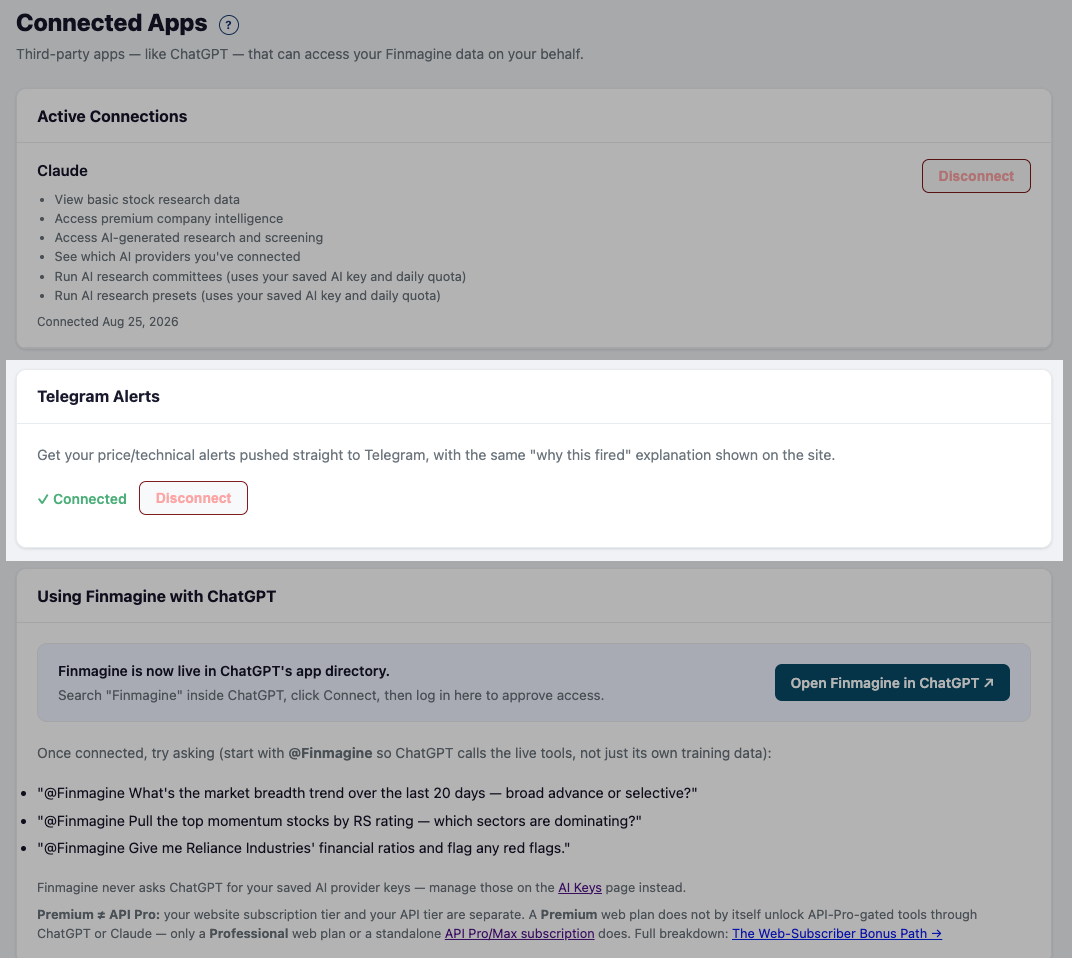
Once connected, this runs independently of opening the app: positions that newly enter 🟡 Approaching or 🔴 Breached during market hours are batched into a single Telegram message per check (worst P&L% first, capped at 10 rows with a "+N more" line if you have more transitions than that in one cycle). If a position stays breached across the week, a summary digest goes out every Saturday morning so nothing lingering gets forgotten.
Related Portfolio Guides
- Portfolio Manager Hub — overview of all 13 tabs and getting started
- Holdings Tab — XIRR, N50/N500, Score, PEG, and broker position columns
- Watchlist Tab — Review Holdings card and the 7 sell signals
- Settings Tab — configuring stop-loss %, PEG denominator, and all thresholds
Ready to Analyse Indian Stocks Like a Pro?
Finmagine gives you 30+ computed financial ratios, sector benchmarks, FII/DII flows, the Finmagine Score, and AI-powered analysis — all in one place.