Following along? Open the live page
Finmagine — free to explore • premium for full access • no app needed
🔔 Interactive US Alerts Hub
Choose a tab below to explore the three distinct monitoring systems for US stocks on Finmagine.
Three Core Alert Systems
Finmagine operates three independent alert structures for US stocks, matching the same systems available for India:
- Price Target Alerts: Simple trigger rules notifying you when a US stock's price crosses above or below your target (available to all registered members).
- Enhanced Technical Alerts: Indicators monitoring RSI thresholds, EMA Golden/Death crosses, 52-week boundaries, or volume surges (Premium access).
- Multi-Condition Alerts: A full rules engine allowing you to combine up to 5 metrics (Price, PE, PB, Volume, etc.) using AND/OR logic under the main US Alerts dashboard (Premium access).
How & Where to Configure Alerts
Alerts are configured across two main interfaces:
- Stock Detail Page: Click the bell icon (🔔) in the header of any US company details page (e.g.
/us/stock/?symbol=AAPL) to set basic Price Targets or Technical triggers. - Alerts Dashboard: Navigate to the main US Alerts page (
/us/alerts/) and click **+ New Alert** to build flexible Multi-Condition rules for any US stock.
All configured alerts, triggered histories, and active toggles are centrally managed in your My Alerts dashboard.
Evaluation Timings & Account Limits
To maintain data integrity and platform performance, we enforce boundaries on evaluation timing and rule limits:
| Alert System | Evaluation Frequency | Active Limit | Access Tier |
|---|---|---|---|
| Price Targets | Nightly, ~3:00 AM IST (after US close) | Max 20 Active | Free & Premium |
| Technical Indicator Triggers | Nightly, ~3:05 AM IST (after US close) | Max 20 Active | Premium Required |
| Multi-Condition Rules | Nightly, ~3:10 AM IST (after US close) | Max 30 Active | Premium Required |
Note: US crons run Tuesday through Saturday IST (the morning after each US trading day), after the nightly US EOD fundamentals and price-history pipelines finish.
Basic Price Target Alerts
Price Target alerts are the simplest way to stay updated on key support and resistance levels. When configured, the system evaluates the stock's current EOD price against your targets.
- Above Target: Fires when the stock price crosses above your value (e.g. notify me if AAPL goes above $220).
- Below Target: Fires when the stock price drops below your value (e.g. buy signal if MSFT drops below $380).
- Notes: You can append a personal note to each alert (e.g. "Support level reached, check fundamentals") which will be included in the Telegram notification.
Triggered price alerts are automatically moved to a "triggered" status, pausing them. To re-enable them, you can dismiss them or delete/recreate them directly from the stock page bell popover.
Enhanced Technical Alerts
Enhanced alerts monitor mathematical momentum and valuation indicators, evaluated against daily close history:
These alerts run nightly, ~3:05 AM IST, after US technical indicators are synced from historical close prices.
Flexible Rules Engine (My Alerts)
For advanced research, the main US Alerts Dashboard allows you to combine fundamental, valuation, and price parameters using logical expressions. This acts as a personalized scanner that alerts you the moment a US stock matches your exact investing thesis.
Available Parameters:
- Price ($): Current stock market price.
- Day Change %: Single-day percentage movement.
- Volume (shares): Number of shares traded during the day.
- PE Ratio (TTM): Trailing twelve months price-to-earnings ratio.
- PB Ratio: Price-to-book ratio.
- Market Cap (USD millions): Total company valuation — US market cap is stored in USD millions, not the crore units used for India.
- % from 52W High: Percentage discount from the highest price in the past year.
"Why This Alert Fired" & Telegram Delivery
Every triggered alert across all three systems — Price Target, Enhanced Technical, and Multi-Condition — shows a short, plain-English explanation of exactly what happened, right next to the trigger. No more staring at a "Triggered" badge wondering which of your conditions actually fired, or re-deriving it yourself from the raw numbers.
Where you'll see it:
- The bell panel on any US stock page — a small accent-coloured line under the trigger date.
- The Trigger History tab on /us/alerts/ — a full-width row under each triggered rule.
📲 Get Alerts on Telegram
US alerts are delivered exclusively via Telegram — every triggered alert is pushed in real time, with the same why-fired explanation and a deep link straight back to the stock page.
- Go to /account/connected-apps.php and find the Telegram Alerts card.
- Click Connect Telegram. A Telegram chat opens in a new tab with Finmagine's alerts bot.
- Tap Start in that chat.
- Return to the Connected Apps page and refresh — the card now shows ✓ Connected.
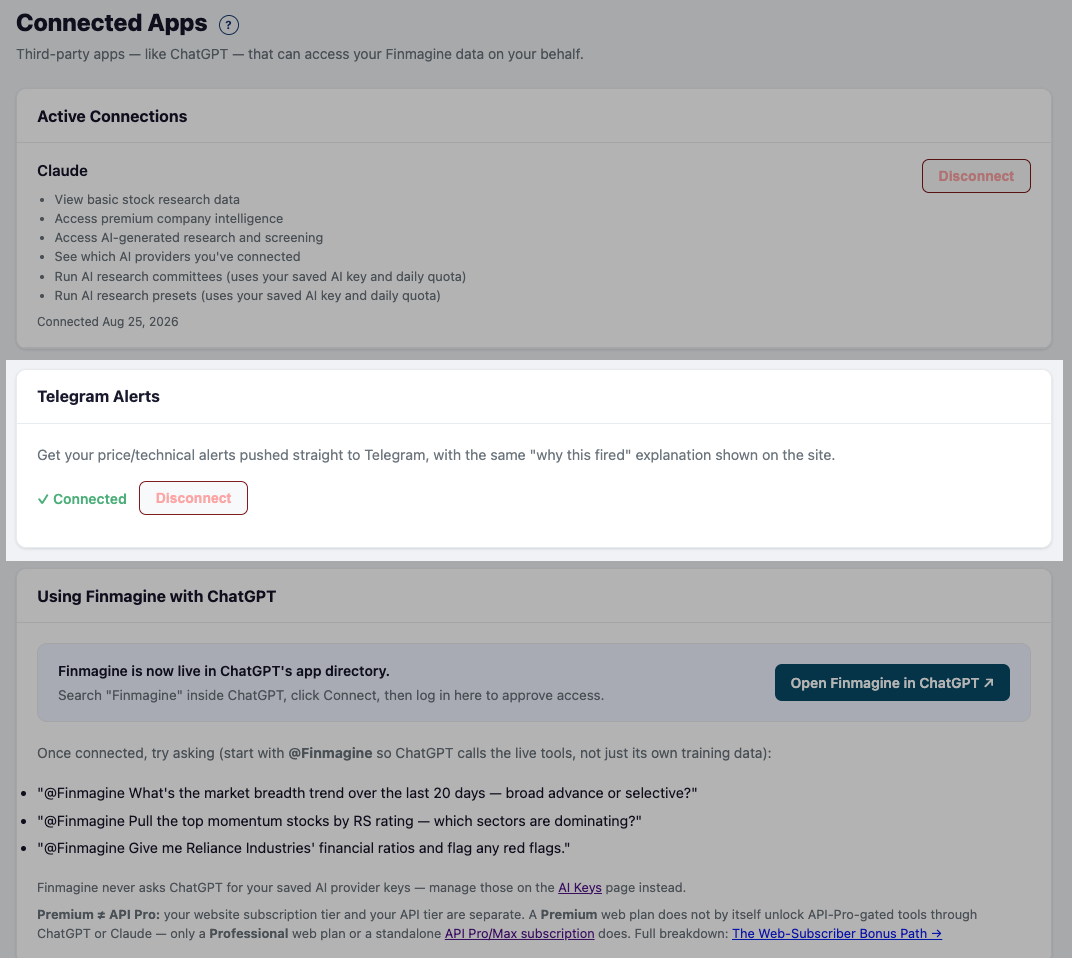
Once connected, any Price Target, Enhanced Technical, or Multi-Condition alert that triggers — on either the India or US side of your account — is pushed to your linked Telegram automatically, one connection covers both markets. Click Disconnect on the same card at any time to stop receiving them.
🧠 Knowledge Check: US Alerts System
2. Enhanced Technical Alerts (technicals, premium)
3. Multi-Condition Alerts (flexible rules engine, premium)
Ready to Analyse Indian Stocks Like a Pro?
Finmagine gives you 30+ computed financial ratios, sector benchmarks, FII/DII flows, the Finmagine Score, and AI-powered analysis — all in one place.