Following along? Open the live page
Finmagine — free to explore • premium for full access • no app needed
Multimedia Learning Hub
Learn the Screener through a structured overview and interactive knowledge test
What You Will Master
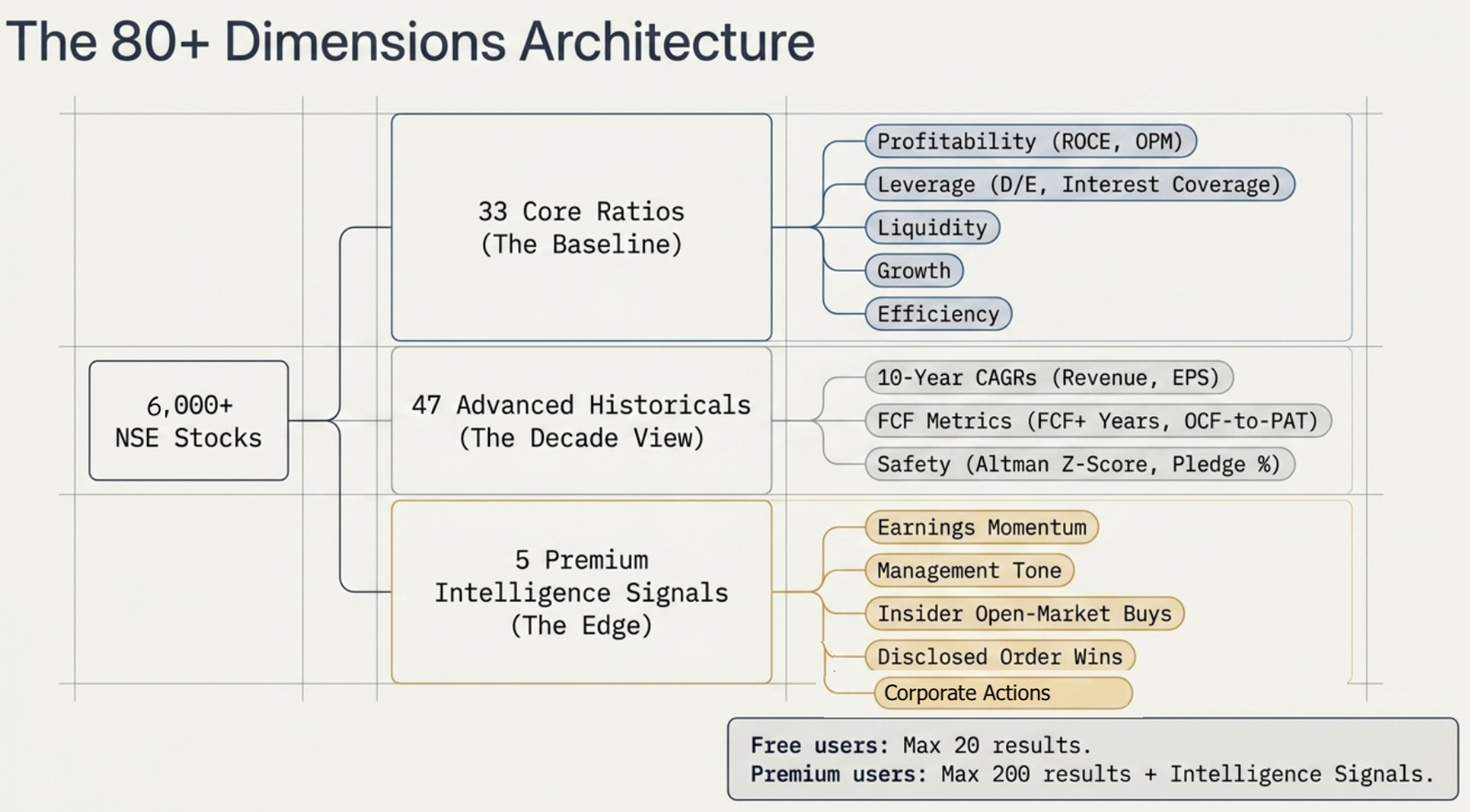
The Finmagine Screener is a fundamental screener for NSE-listed stocks — not a price-chart scanner. It works by querying the Intelligence Engine's pre-computed ratio classifications and 10-year historical metrics. Every company in the database has been assigned an Excellent / Good / Average / Poor grade and an Improving / Stable / Declining trend for up to 33 financial ratios, plus a set of historical quality metrics computed from a full decade of financial data — CAGRs, FCF patterns, median profitability, consistency scores, and Altman Z-Score. A Premium-only Finmagine Intelligence Filters panel adds proprietary, non-financial-statement signals on top — earnings momentum, management tone, insider activity, and order wins. Together these give you 80+ filterable dimensions across the full 6,000+ stock universe.
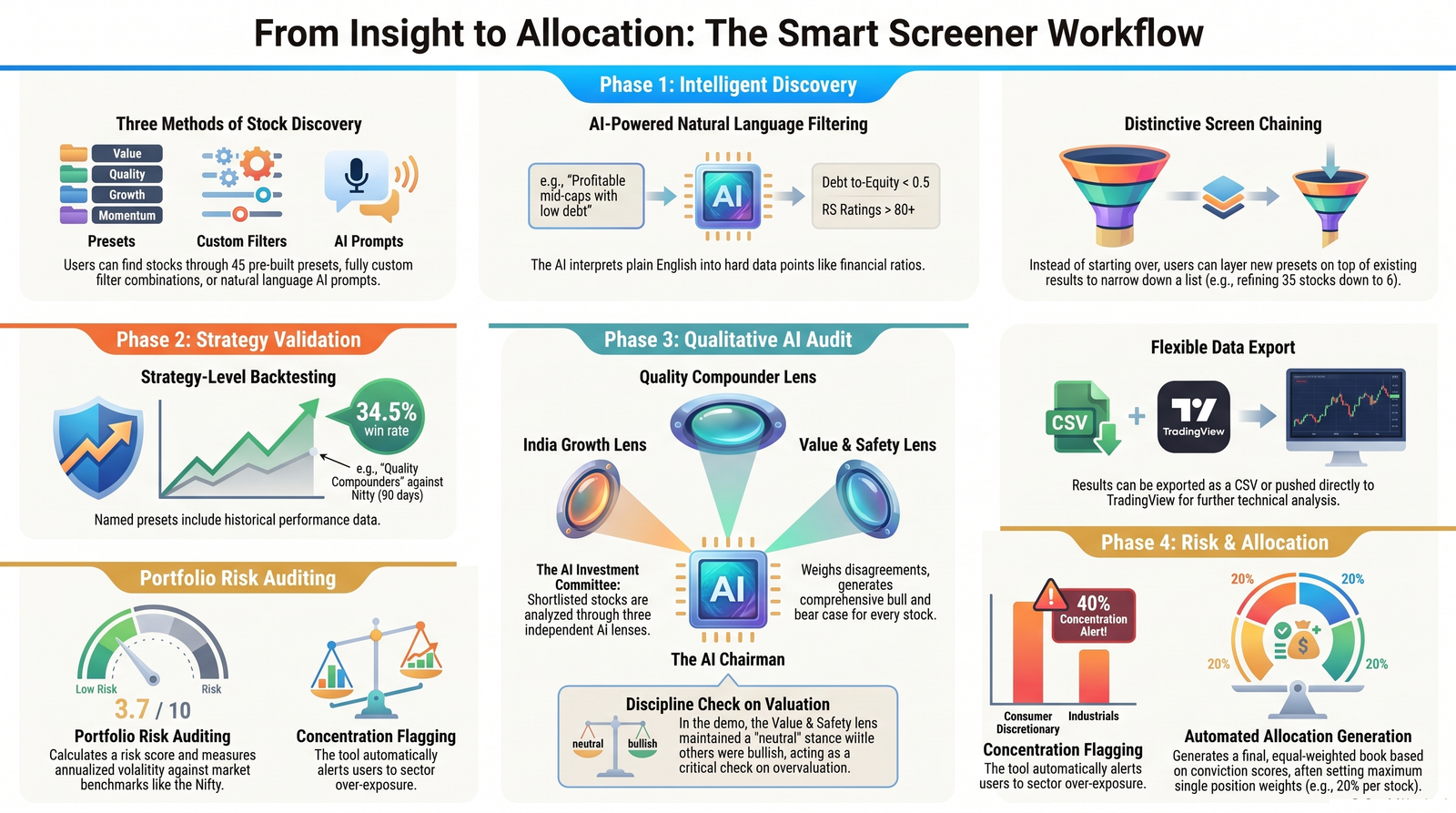
What This Guide Covers:
- The classification system — what Excellent, Good, Average, and Poor mean for each ratio category
- The 45 Quick Screen presets — what each one does and when to use it, including 6 Historical Quality presets, 5 Technical & Momentum presets, and 4 Finmagine Intelligence Filters presets
- The custom filter builder — adding ratio conditions, classification chips, and trend filters
- The Advanced Historical Filters panel — 10-year CAGRs, FCF metrics, consistency scores, and safety signals
- Finmagine Intelligence Filters (Premium) — earnings momentum, management tone trajectory, insider open-market buying, and order wins
- The 33 ratio filters + 47 historical dimensions — 80+ total, organised by category
- Extra filters — Sector, Sub-Sector, MCap range, 30+ Sort options
- The global quality floor — what it is and how it affects results
- Free vs Premium limits — 20 results vs 200, Intelligence Filters are Premium-only
- Reading results — 8 new historical quality columns in the results table
- Practical workflows — from screen to stock page
Who This Is For:
- Fundamental investors — screen for quality, value, or growth characteristics before deep-diving into individual stocks
- Framework followers — apply time-tested strategies (Magic Formula, Graham Defensive, Coffee Can, Piotroski) with one click
- Idea generators — discover stocks you have never encountered by filtering on ratio trends rather than just current levels
Video Walkthroughs
The Screener shows up in two different end-to-end workflows — each is a real, live-data screen recording with its own dedicated guide:
The Classification System — How Ratios Are Graded
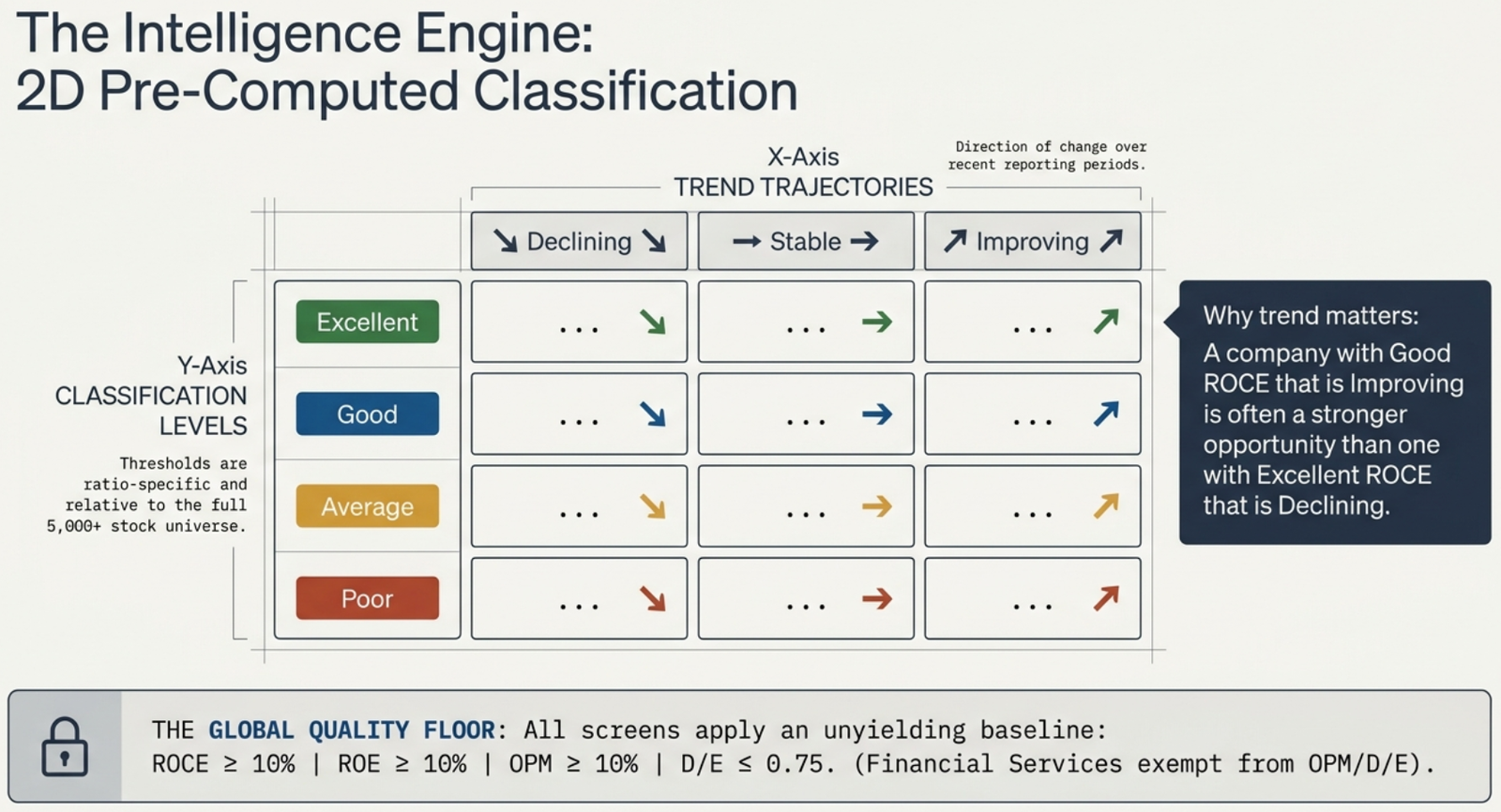
The Screener does not work with raw ratio values. Instead, the Intelligence Engine pre-computes a classification for every ratio of every company: one of four tiers.
The thresholds vary by ratio. For ROCE, "Excellent" means a very high return on capital; for D/E, "Excellent" means very low debt relative to equity. The classification is ratio-specific and built from the distribution across the full stock universe — so "Excellent ROCE" means excellent relative to all Indian listed companies, not just within a sector.
In addition to classification, each ratio has a trend — the direction of change over the past several reporting periods:
- ↗ Improving — the ratio has been getting better
- → Stable — little directional change
- ↘ Declining — the ratio has been deteriorating
The 45 Quick Screen Presets
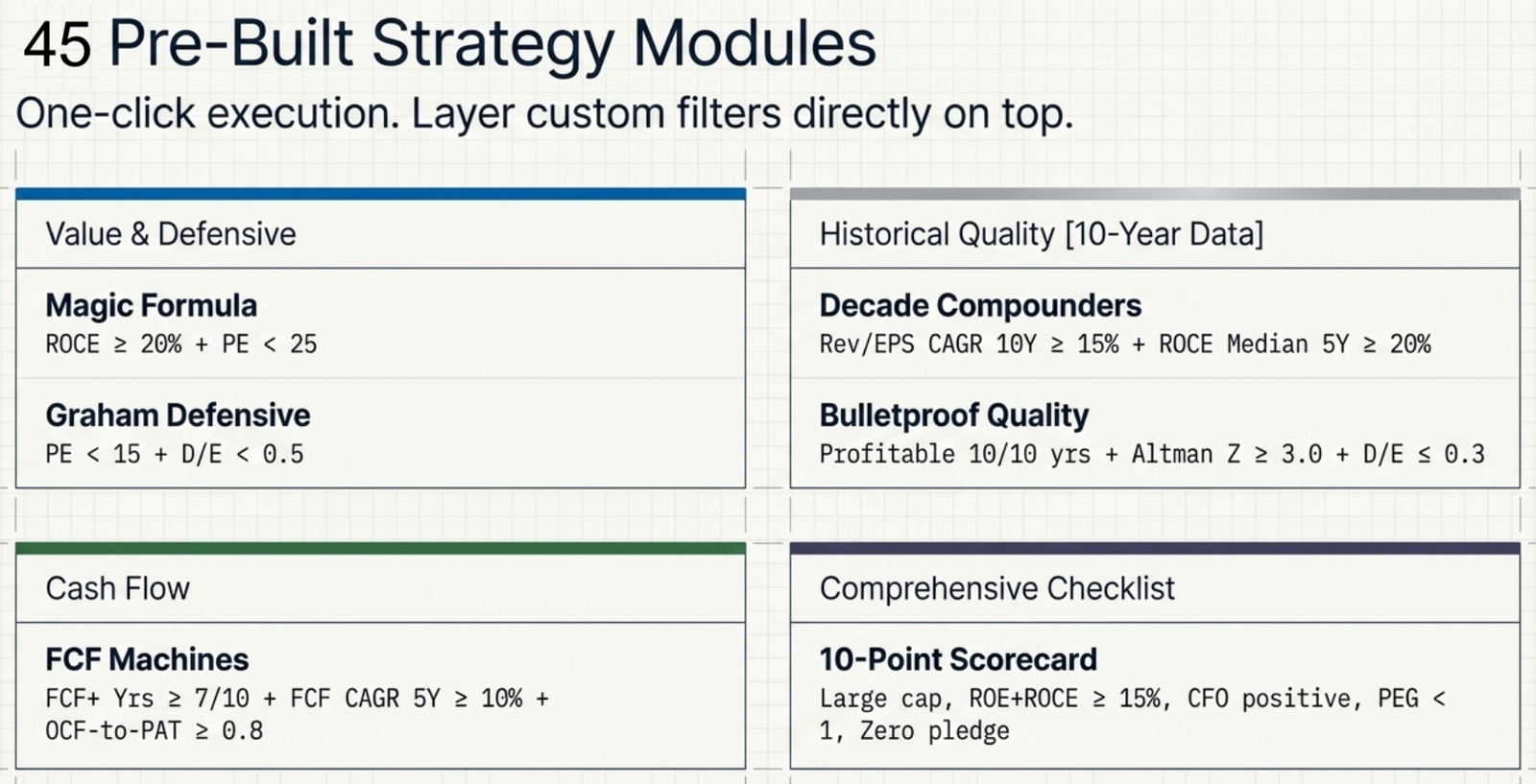
Click any preset card to instantly load a proven filter combination. The screen runs immediately — no configuration required. You can then add extra filters (Sector, MCap) on top of a preset or modify the conditions in the filter builder.
The first 20 presets use the standard ratio classification system, plus one comprehensive checklist preset (10-Point Scorecard). Five additional presets apply technical and momentum criteria (CANSLIM, Minervini VCP, O'Neil Leaders, RS Momentum, Accumulation Zone). Six Historical Quality presets draw on 10 years of financial data — they use Advanced Historical Filters to find companies with proven long-run quality characteristics that a single year's ratios cannot reveal. The final 4 Finmagine Intelligence Filters presets (Premium-only) draw on proprietary, non-financial-statement signals — recent earnings momentum, management tone trajectory, insider open-market buying, and order wins — see the dedicated section below.
Quality & Profitability Presets
Balance Sheet & Safety Presets
Growth Presets
Value Presets
Ownership & Momentum Presets
Comprehensive Checklist Preset
Historical Quality Presets 10-YEAR DATA
These six presets go beyond the current year's ratios. They use 10 years of computed financial history to identify companies with durable, structural quality — the kind that only reveals itself when you look across full business cycles.
Selection Universes and Chained Screening
By default, the screener queries all listed stocks in the Finmagine database. However, you can restrict your search to a specific subset of the market using the Universe Bar:
| Universe | What It Does | Multi-Select / Dropdown Support |
|---|---|---|
| All Stocks | Queries the entire database of 6,000+ Indian listed equities. | Default. |
| My Watchlist | Limits the screen to stocks currently saved in your watchlist. | Watchlist Dropdown: Select individual lists (e.g. Default, Family, Seniors) to union their symbols automatically. |
| My Portfolio | Limits the screen to stocks currently held in your portfolios. | Holdings Dropdown: Select individual portfolio accounts/labels to union symbols. |
| Current Results | Locks in the results of your previous screen run as the active universe. | Allows you to chain multiple screens sequentially. |
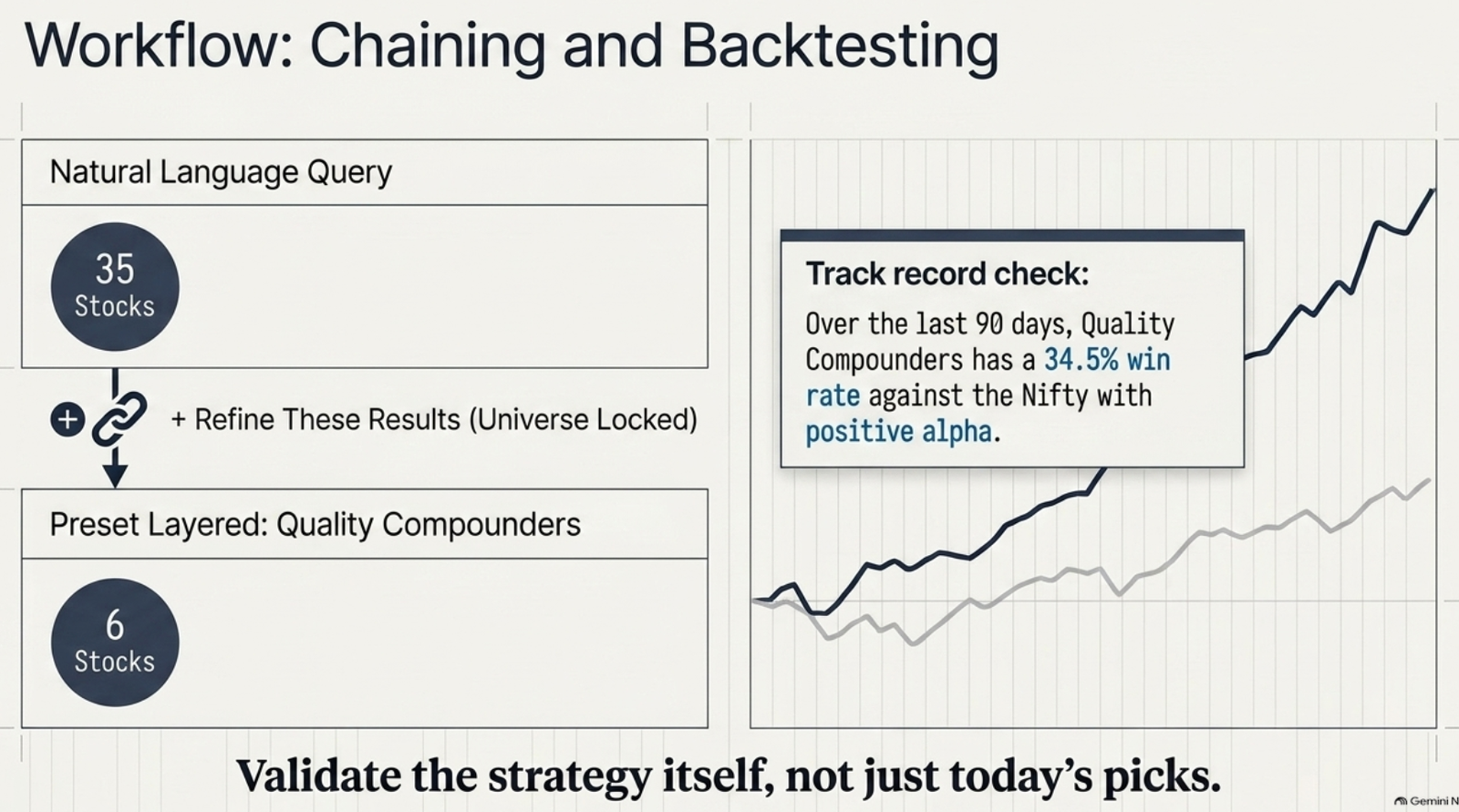
Chained Screening ("Refine These Results")
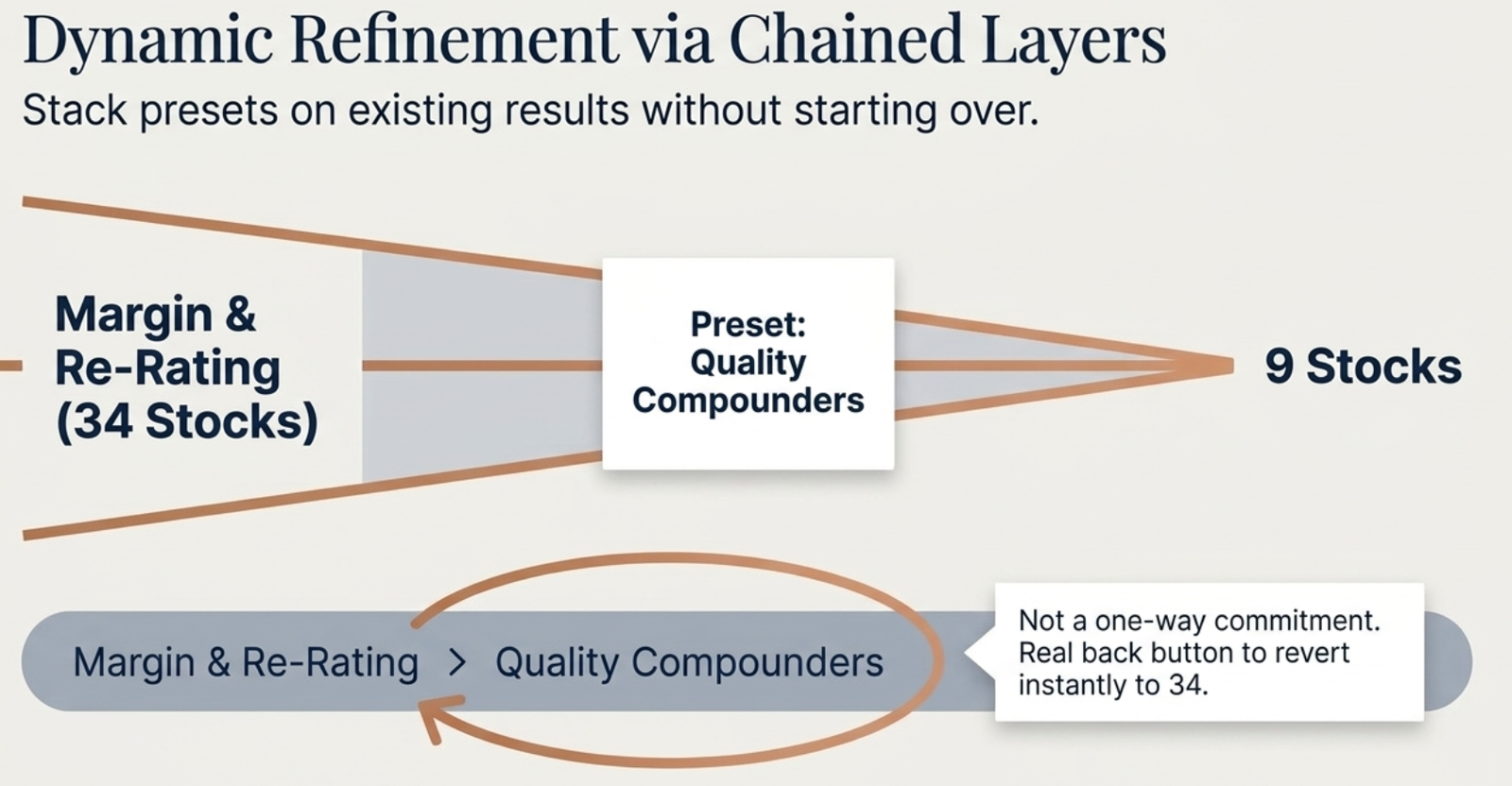
The Current Results universe enables you to run multiple screeners in sequence to find their intersection. This is a powerful workflow for power users who want to apply separate, independent strategy templates:
- Run a preset like Quality Compounders on All Stocks (returning e.g., 144 results).
- Click the Refine These Results button in the results header. The active universe will lock to
Current Results (144). - Select and run a second preset like Momentum Movers.
- The screener will output only the companies that satisfy both presets (e.g., 52 stocks).
A visible chain summary breadcrumb will appear above the table to keep track of your filters (e.g. Quality Compounders → Momentum Movers → 52 stocks), which you can clear at any time by clicking ✕ Clear. The breadcrumb also carries a ← Back button — distinct from Clear — that pops just the last chained step and instantly restores the exact prior filter state, so chaining is never a one-way commitment.
Building a Custom Screen
Click + Add Condition to open a filter row. Each row has three controls:
- Ratio dropdown — 33 ratios grouped by category (Profitability, Leverage, Liquidity, Growth, Efficiency). Select the ratio you want to filter on.
- Classification chips — click one or more of Excellent Good Average Poor. Selecting multiple means OR within that condition — e.g. "Excellent OR Good" means either tier qualifies.
- Trend dropdown — optionally filter by Improving / Stable / Declining. Leave blank to ignore trend.
Add multiple rows with + Add Condition. Each row is combined with AND logic — the company must satisfy every condition to appear in results. Click × on any row to remove it. Click Clear all to reset.
The "Latest Results Only" Checkbox
Tick this to restrict results to companies whose ratio data has been updated within the last 90 days. This is useful when you want to ensure the financial data underpinning the classifications is current — for example, filtering out companies that have delayed quarterly filings or have stale ratio entries in the engine.
Advanced Historical Filters
Click the ▶ Advanced Historical Filters panel (below the custom filter builder) to reveal inputs for 10-year financial history metrics. These are direct numeric range filters — set a minimum, a maximum, or both for each dimension. Unlike the classification chips (which use pre-computed tiers), historical filters let you apply your own thresholds.
Growth History Filters
| Filter | What It Measures | Useful Threshold |
|---|---|---|
| Revenue CAGR 3Y / 5Y / 10Y (%) | Compounded annual revenue growth over each horizon | Min 15% (10Y) for long-run compounders |
| PAT CAGR 3Y / 5Y / 10Y (%) | Compounded net profit growth over each horizon | PAT CAGR should exceed Revenue CAGR for margin expansion |
| EPS CAGR 3Y / 5Y / 10Y (%) | Per-share earnings growth — accounts for dilution unlike PAT CAGR alone | Min 12% (10Y) for quality compounders |
| BV CAGR 3Y / 5Y (%) | Book value per share growth — measures equity value compounding | Min 10% for balance-sheet-led compounders |
Margin & Re-Rating Filters PREMIUM
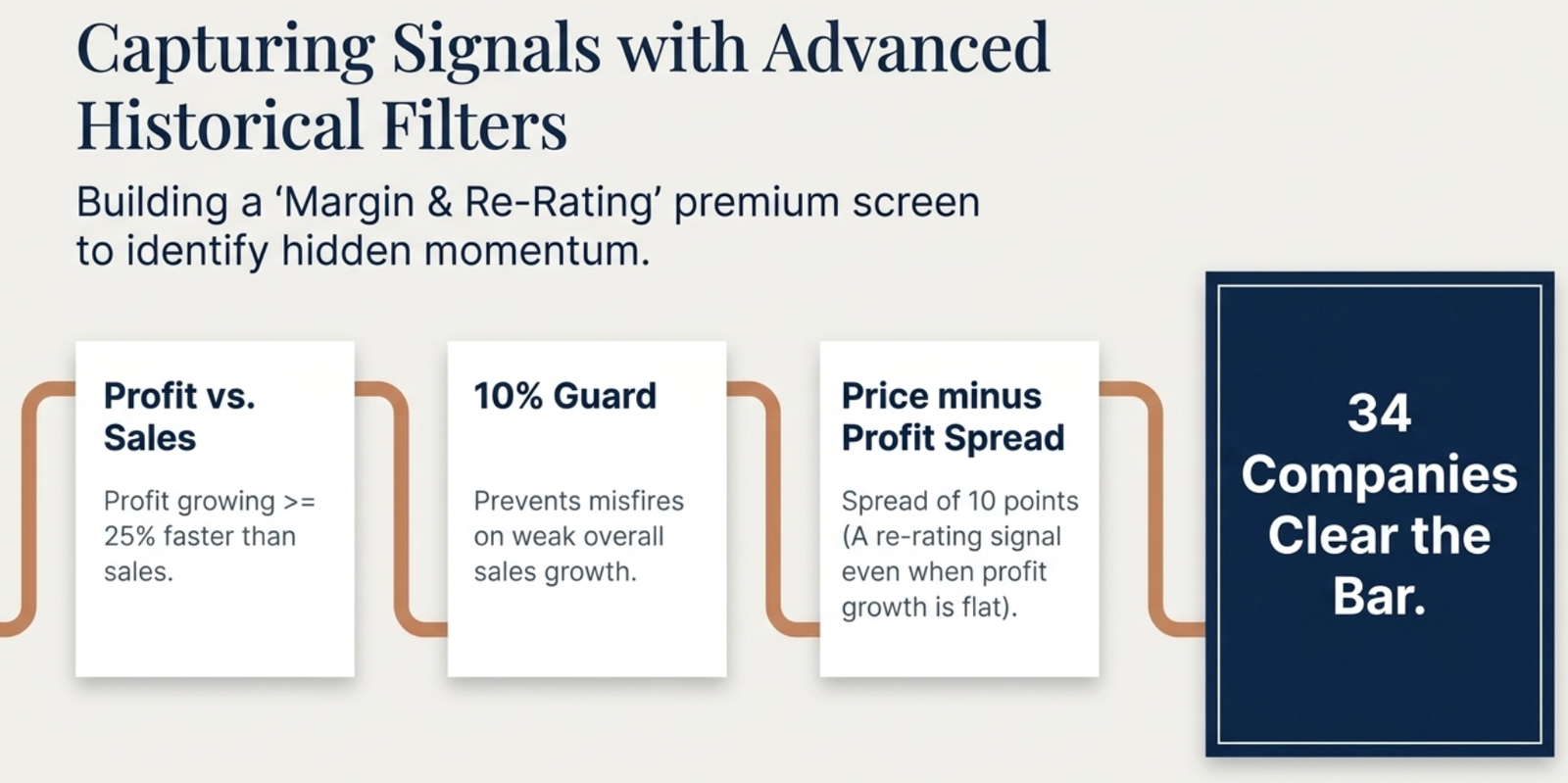
A three-field group that isolates re-rating candidates — companies where profit growth is running ahead of sales growth, a pattern that often precedes the market assigning a higher multiple. Unlike the classification chips, these are raw numeric thresholds you set yourself.
| Filter | What It Measures | Useful Threshold |
|---|---|---|
| TTM Profit Growth ≥ Sales Growth × multiplier | Requires trailing-12-month profit growth to run at least this many times faster than sales growth — the core margin-expansion signal | 1.25× as a starting point (profit growing ≥25% faster than sales) |
| …guard: Sales Growth ≥ % | A floor under the multiplier check above, so it doesn't false-fire on a company with weak or negative sales growth where any profit uptick looks like a huge multiple | Min 10% to require genuine top-line growth underneath the margin story |
| Price − Profit Spread ≥ pts | 1-year price return minus TTM profit growth, in percentage points — a spread, not a ratio, so it still catches re-rating when profit growth is near zero or negative | Min 10 points for a clear re-rating signal even when profit growth is flat |
Quality & Consistency Filters
| Filter | What It Measures | Useful Threshold |
|---|---|---|
| OPM Median 5Y / 10Y (%) | Median operating margin across 5 or 10 years — structural profitability, not peak | Min 15% for quality businesses; min 20% for strong moats |
| ROCE Median 5Y (%) | Median return on capital over 5 years | Min 15% baseline; min 20% for high-quality |
| ROE Median 5Y (%) | Median return on equity over 5 years | Min 15% for capital-efficient businesses |
| Profitable Years (out of 10) | How many of the last 10 fiscal years were profitable | Set min 9 for near-zero tolerance; min 8 for cyclical allowance |
| OPM Expanding (3Y) | Boolean — tick to require margin expansion over the last 3 years | Combine with OPM Median ≥ 15% for expanding moat signal |
| ROCE Improving (3Y) | Boolean — tick to require ROCE improvement over the last 3 years | Use with a ROCE floor to find improving-quality businesses |
Cash Flow Filters
| Filter | What It Measures | Useful Threshold |
|---|---|---|
| FCF+ Years (out of 10) | How many of the last 10 years had positive Free Cash Flow | Min 7 for "FCF Machine" qualification |
| OCF-to-PAT 5Y avg | 5-year average ratio of Operating Cash Flow to Net Profit — earnings quality | Min 0.8 (80% of profit backed by cash) |
| FCF Yield (%) | Free Cash Flow as % of Market Cap — valuation via real cash generation | Min 3–4% for value-oriented screens |
| FCF CAGR 3Y / 5Y (%) | Growth rate of Free Cash Flow | Min 10% (5Y) for growing cash generators |
| Capex Intensity 3Y | 3-year average Capex as a fraction of revenue — how asset-heavy the business is | Max 0.15 for asset-light; max 0.30 for moderate capex |
| Net Debt Change 3Y (₹ Cr) | Change in net debt over 3 years — negative means deleveraging | Max 0 (or negative) to require debt reduction |
Safety & Income Filters
| Filter | What It Measures | Useful Threshold |
|---|---|---|
| Altman Z-Score | Financial distress predictor for non-financial companies. >2.99 = safe zone; 1.81–2.99 = grey zone; <1.81 = distress | Min 3.0 for zero-distress-risk requirement |
| Altman Z Improving (3Y) | Boolean — tick to require improving financial safety trend | Use when current Z is acceptable but you want to see direction |
| Dividend Years (out of 10) | How many of the last 10 years a dividend was paid | Min 7 for income-consistency screens |
| Dividend CAGR 5Y (%) | 5-year dividend per share growth rate | Min 5% for dividend growth investing |
| Cash to MCap (%) | Cash and equivalents relative to market cap | Min 10% for value screens with cash cushion |
| Pledge % (max) | Promoter shares pledged as % of total shareholding | Max 5% for zero-pledge screens; max 10% for moderate allowance |
Finmagine Intelligence Filters PREMIUM
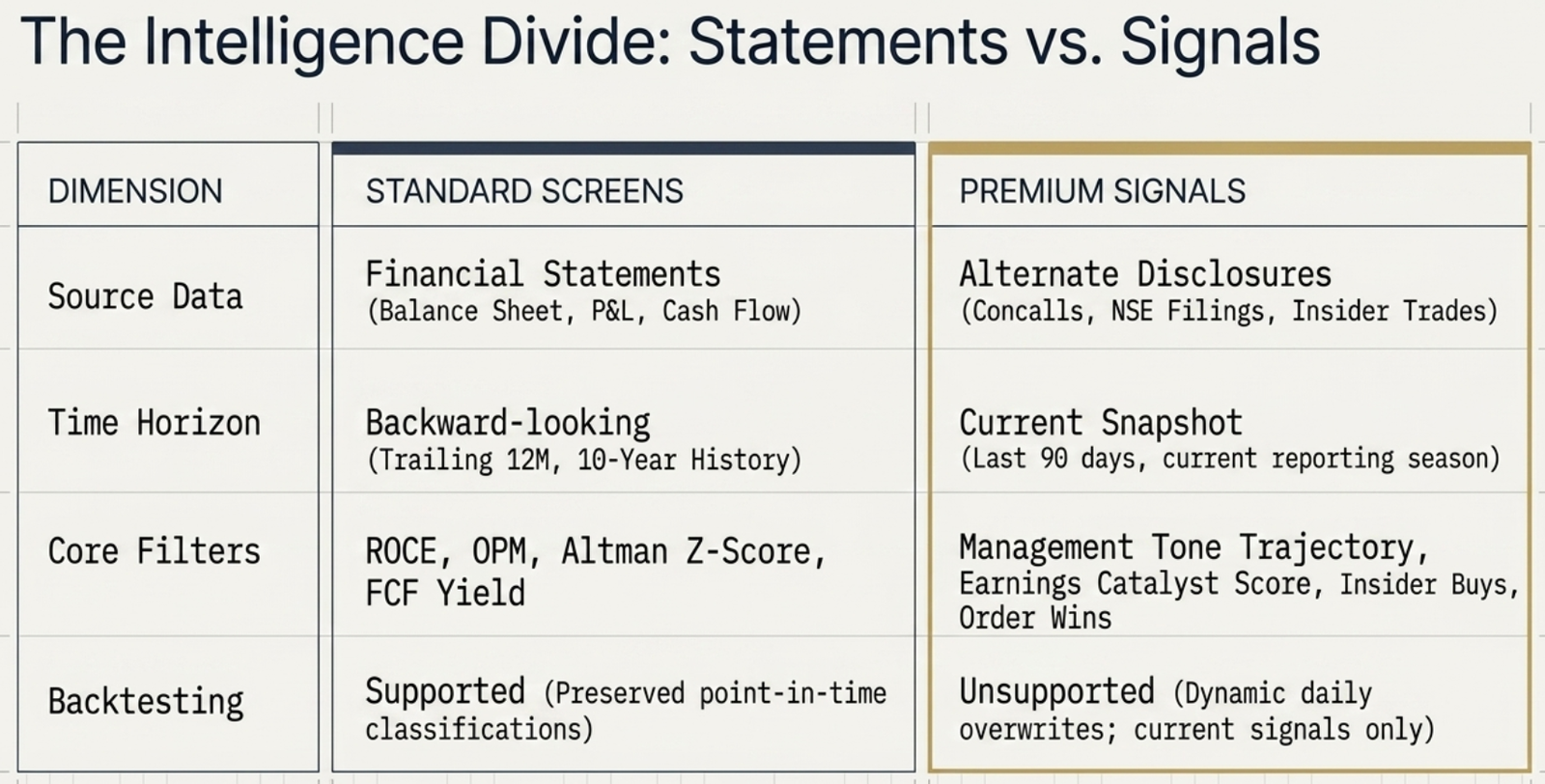
Below Advanced Historical Filters is a second expandable panel, 🎯 Finmagine Intelligence Filters. Where every other filter in the Screener is derived from financial statements (income statement, balance sheet, cash flow), this panel screens on signals that come from a different kind of data entirely — quarterly earnings reactions, management's own words on concalls, real open-market insider transactions, and disclosed order wins and corporate actions. It is Premium-only: Free and Guest users see the panel and its four preset cards for reference, but every input stays disabled and clicking a locked preset routes to the upgrade page.
| Sub-panel | What It Filters On | Source |
|---|---|---|
| 📊 Earnings Momentum | ECS Score (min threshold), PEAD confirmed this quarter, current reporting season only | Earnings Catalyst Score engine — see the ECS guide |
| 🗣️ Management Tone | Tone trajectory (Improving / Stable / Deteriorating / Volatile) derived from concall analysis across recent quarters | AI concall decoder |
| 👤 Insider Activity | Net insider value (₹ Cr, 90 days), open-market buy count (90 days) | NSE insider trading disclosures — Market Purchase / Market Sale only, not ESOP exercises, gifts, or inter-se transfers. See the Insider Activity guide |
| 📦 Order Wins | Order win count (90 days), order win value (₹ Cr, 90 days) | NSE corporate announcements, AI-extracted, high/medium confidence only. See the Order Wins guide |
| 🏢 Corporate Actions | Recent action type (90 days), upcoming declared action | NSE corporate action calendar |
Finmagine Intelligence Filters Presets
The US Stock Screener has its own Finmagine Intelligence Filters panel covering Earnings Momentum, Management Tone, and Insider Activity. US Order Wins and Corporate Actions filters are not available — SEC disclosure requirements don't include an equivalent to NSE's mandatory order-win announcement category, and no corporate-action data source exists yet for US-listed companies.
All 33 Ratio Filters
These are the standard ratio filters using the Excellent / Good / Average / Poor classification system and optional Improving / Stable / Declining trend filter.
| Category | Ratio | What It Measures |
|---|---|---|
| PROFITABILITY | ||
| ROCE | Return on Capital Employed — profit generated per rupee of total capital deployed | |
| ROE | Return on Equity — profit generated per rupee of shareholders' equity | |
| Operating Margin (OPM) | Operating profit as % of revenue — core business profitability before interest and tax | |
| Net Profit Margin (NPM) | Net profit as % of revenue — bottom-line profitability after all costs | |
| EBITDA Margin | EBITDA as % of revenue — cash operating profitability | |
| CFO / PAT (Cash Conversion) | Operating cash flow as a ratio of reported profit — measures earnings quality | |
| LEVERAGE | ||
| Debt / Equity (D/E) | Total debt relative to shareholders' equity — financial leverage | |
| Interest Coverage | EBIT / Interest expense — ability to service debt from operating profit | |
| Debt / EBITDA | Years of EBITDA needed to repay total debt | |
| Net Debt / EBITDA | Same as Debt/EBITDA but uses net debt (debt minus cash) | |
| Net Debt / Equity | Net debt relative to equity | |
| Debt / Assets | Proportion of total assets funded by debt | |
| LIQUIDITY | ||
| Current Ratio | Current assets / current liabilities — short-term solvency | |
| Quick Ratio | Liquid assets / current liabilities — excludes inventory | |
| Cash Ratio | Cash only / current liabilities — the most conservative liquidity measure | |
| GROWTH | ||
| Revenue Growth (CAGR) | Compounded annual revenue growth — topline expansion | |
| PAT Growth (CAGR) | Compounded annual profit after tax growth — earnings expansion | |
| EBITDA Growth (CAGR) | Compounded annual EBITDA growth — cash earnings expansion | |
| EFFICIENCY | ||
| Asset Turnover | Revenue generated per rupee of total assets | |
| Inventory Turnover | How many times inventory is sold and replaced in a year | |
| Receivables Turnover | How quickly a company collects payments from customers | |
| Fixed Asset Turnover | Revenue generated per rupee of fixed assets (PP&E) | |
| Capital Employed Turnover | Revenue relative to capital employed | |
| Debtor Days | Average days to collect a receivable | |
| Inventory Days | Average days inventory is held before sale | |
| Payable Days | Average days to pay suppliers | |
| Working Capital Cycle | Debtor Days + Inventory Days − Payable Days — cash conversion cycle | |
| Capex / Depreciation | Reinvestment rate — >1 means investing more than the asset base is depreciating | |
| Plant & Equipment Turnover | Revenue generated per rupee of plant and equipment | |
Extra Filters — Sector, MCap, and Sort
The Extra Filters strip below the custom filter builder lets you further narrow or organise results without adding ratio conditions:
| Filter | What It Does |
|---|---|
| Sector | Restrict results to a single sector (e.g. Pharmaceuticals, Financial Services, Consumer Goods). Use this when you already know the sector you want to invest in. |
| Sub-Sector | Further narrowing within a sector (e.g. within Pharmaceuticals: API manufacturers, formulations, hospitals). More specific than sector alone. |
| MCap Min (₹ Cr) | Set a minimum market cap floor. Common values: ₹500 Cr (eliminate micro-caps), ₹5,000 Cr (mid-cap and above), ₹25,000 Cr (large-cap only). |
| MCap Max (₹ Cr) | Set a maximum market cap ceiling. Use to focus on small or mid-cap opportunities (e.g. max ₹10,000 Cr for small-cap screens). |
| Sort By | 30+ sort options across five groups: Core (Market Cap, ROCE, ROE, OPM, D/E, PE, Revenue Growth, Company Name); Growth History (Revenue CAGR 3Y/5Y/10Y, EPS CAGR 3Y/5Y/10Y, PAT CAGR 5Y); Quality & Consistency (OPM Median 5Y, ROCE Median 5Y, Profitable Years, ROCE Improving); Cash Flow (FCF Yield, FCF CAGR 3Y/5Y, FCF+ Years, OCF-to-PAT); Safety & Income (Altman Z-Score, Pledge %, Dividend Years, Cash to MCap). |
| Order | High → Low (default, shows best values first) or Low → High (useful for D/E, PE, Pledge %, and Capex Intensity where lower is better). |
The Global Quality Floor
Every screen — preset or custom — applies a baseline quality filter that cannot be turned off:
- ROCE ≥ 10%
- ROE ≥ 10%
- OPM ≥ 10%
- D/E ≤ 0.75
This floor prevents the screener from surfacing genuinely poor-quality businesses even when a user has not set those criteria manually. It is the reason you may sometimes get fewer results than expected — a company that passes your ratio conditions but fails the quality floor is excluded.
Interactive Chart Review and Keyboard Navigation
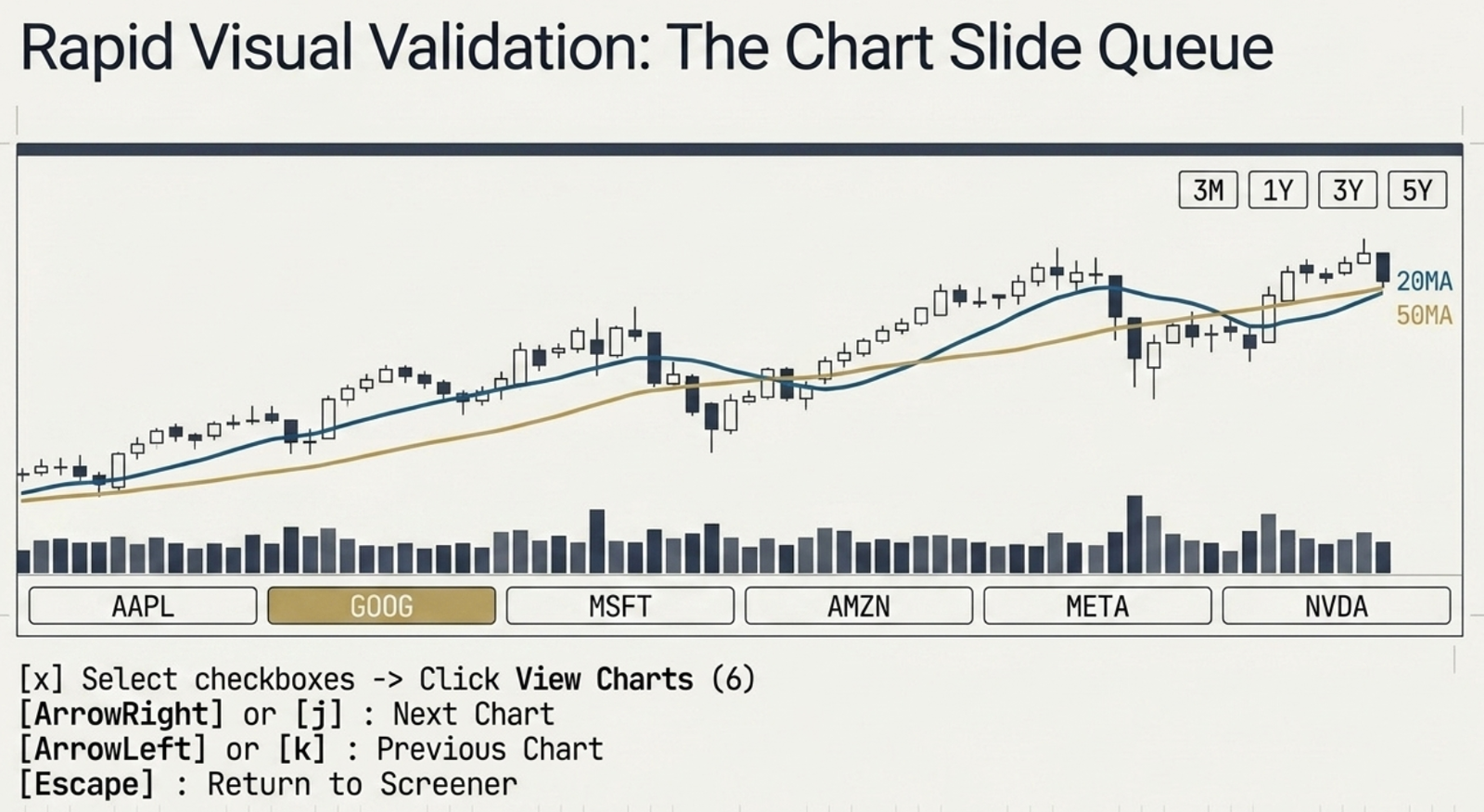
Instead of clicking back and forth between a stock's page and the screener results list, you can inspect charts for multiple companies using the Chart Slide Queue:
- Tick the checkboxes next to the companies in your result list (or use the master checkbox in the table header to select all).
- Click the floating View Charts (N) button that appears in the screener header.
- This opens a fullscreen slide viewer (
charts.php) in a new browser tab containing the selected stocks.
Features of the Native Chart Slide Viewer
- TradingView Lightweight Charts (LWC): Powered by a high-performance native canvas library, the charts load instantly without loading the heavy standard TradingView iframe wrapper.
- Technical Overlays: Displays candlestick price action overlaid with a blue 20-period Moving Average (20MA) and a yellow 50-period Moving Average (50MA).
- Volume Analysis: Displays historical volume histograms along the bottom axis of the chart area.
- Dynamic History Ranges: Click the 3M / 1Y / 3Y / 5Y buttons to fetch and display the respective historical ranges dynamically.
- Symbol strip navigation: A scrollable carousel of symbol pills lines the bottom of the screen. Click any pill to jump straight to that stock's chart.
Keyboard Hotkeys
For a highly optimized workflow, you can navigate using your keyboard:
| Hotkey | Action |
|---|---|
ArrowRight or j | Slide to the next chart in your queue. |
ArrowLeft or k | Slide to the previous chart in your queue. |
Escape | Close the queue and return to the Screener results list. |
Use the Open Stock Page ↗ action to deep-dive into the company's full data, or click ✕ Remove to exclude a stock from your active review deck.
Plain-English AI Screener (Natural Language)
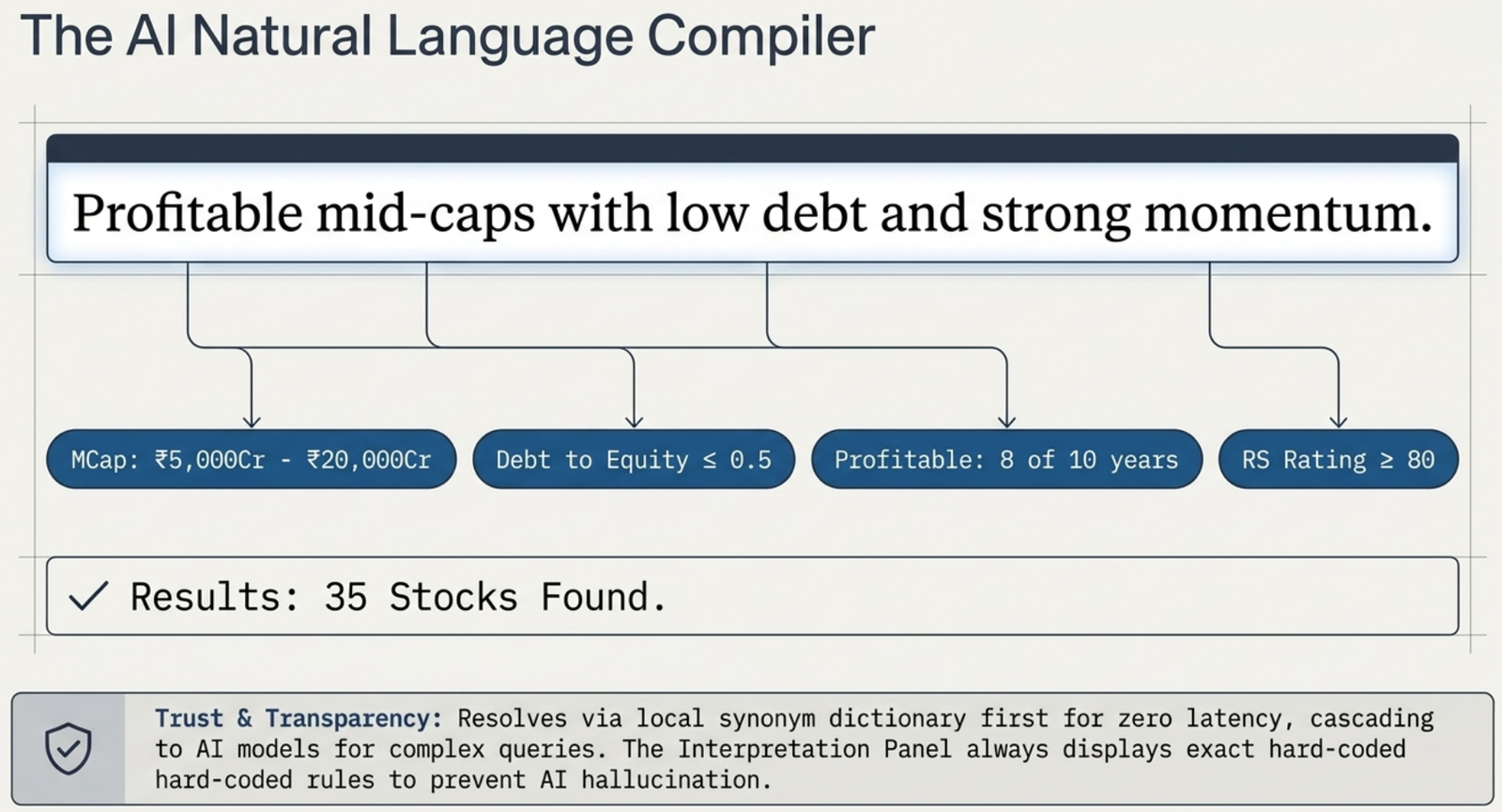
In addition to manual custom filters, you can query the screener using natural English commands (e.g. "profitable mid-caps with low debt") in the AI Screen bar.
The Multi-Tier Resolution Stack
To avoid latency, paid API fees, and trust issues, queries resolve through a layered compiler stack:
- Synonym Layer (Free & Instant): Checks your search query against a dictionary of common financial terms. Phrases like
mid-caps,low debt,debt-free,momentum, andprofitableare instantly parsed locally without making external LLM calls. - Free AI Quotas: If the query is complex or ambiguous, it is resolved via the Gemini Free Tier or Groq Free Tier (running on small, fast open models).
- BYO Key (coming soon): A future Account Settings option will let advanced users supply their own API key (Anthropic Claude, OpenAI, Gemini, Groq, or DeepSeek) to bypass the daily free-tier limit.
Trust & Transparency (Interpreted Filters)
To prevent AI hallucinations, the screener displays a visible Interpretation Panel above the results table (e.g. Interpreted as: D/E ≤ 0.5 · Profitable 8/10 yrs). This ensures you know exactly what filters the AI applied and can edit them in the builder if needed.
Reading Results and the Screener → Stock Workflow
Each result row shows:
- Company name and NSE symbol
- Sector / Sub-Sector
- Core ratios — ROCE, ROE, OPM, D/E, Revenue Growth, MCap with classification badges (Excellent / Good / Average / Poor)
- 8 Historical Quality columns — always visible so you can see long-run quality at a glance without opening each stock page
| Column | What It Shows | Green When |
|---|---|---|
| EPS 5Y | EPS CAGR over 5 years (%) | ≥ 15% |
| PAT 5Y | PAT CAGR over 5 years (%) | ≥ 15% |
| OPM Med | 5-year median operating margin (%) | ≥ 15% |
| FCF Yld | Free Cash Flow yield (% of MCap) | ≥ 3% |
| FCF+ Yrs | Years with positive FCF out of 10 | ≥ 7 |
| Prof Yrs | Profitable years out of 10 | = 10 |
| Z-Score | Altman Z-Score (non-financial only) | ≥ 3.0 (safe zone) |
| Pledge | Promoter pledge % of shareholding | = 0% (red when ≥ 10%) |
Click any row to open the full stock page for that company. From there, use the Overview tab for the Ratio Health score and Strengths/Concerns, the Financials → Analytics sub-tab for the full Historical Quality Scorecard, the Ratios tab for the complete 30+ ratio breakdown, the Analysis tab for the investment thesis, and the Compare button to benchmark against peers.
Free vs Premium Result Limits
| Tier | Max Results |
|---|---|
| Guest / Free | 20 results per screen |
| Premium | 200 results per screen |
For many screens, 20 results is enough — Quality Compounders typically returns 30–50 companies and the top 20 by ROCE are already the cream. But for broader screens like Growth Accelerators or Momentum Movers where the universe is larger, Premium unlocks the full depth.
Recommended Workflow — Screen to Conviction
- Start with a preset that matches your investment style
- Add a sector filter to narrow to an industry you understand
- Sort by ROCE High→Low to put the best-quality businesses first
- Check the top 3–5 results using the row checkboxes
- Click 🏛 Committee to send them for lens-by-lens AI analysis — or open each stock page individually for deep-dive reading
- Use the Analysis tab and Investment Committee to build conviction before deciding
Screener → Investment Committee
Once your screen surfaces candidates, the fastest next step is the Investment Committee — a structured AI analysis workflow in Strategy Lab that evaluates your shortlisted stocks through three analytical lenses simultaneously. You do not need to retype any symbols.
How the Handoff Works
- Run your screen and review the results table.
- Check 1–5 rows using the checkbox in the first column of each row. The header checkbox selects all visible rows (capped at 5).
- The 🏛 Committee (N) button in the results header activates as you tick rows — it stays dimmed until at least one row is selected.
- Click 🏛 Committee (N). You land on the Investment Committee tab in Strategy Lab with your selected symbols already pre-loaded.
- Choose a committee template and your BYO API key, then click Start Committee.
/strategy-lab/?tab=committee&symbols=TCS,INFY,HCLTECH,HINDUNILVER,ITC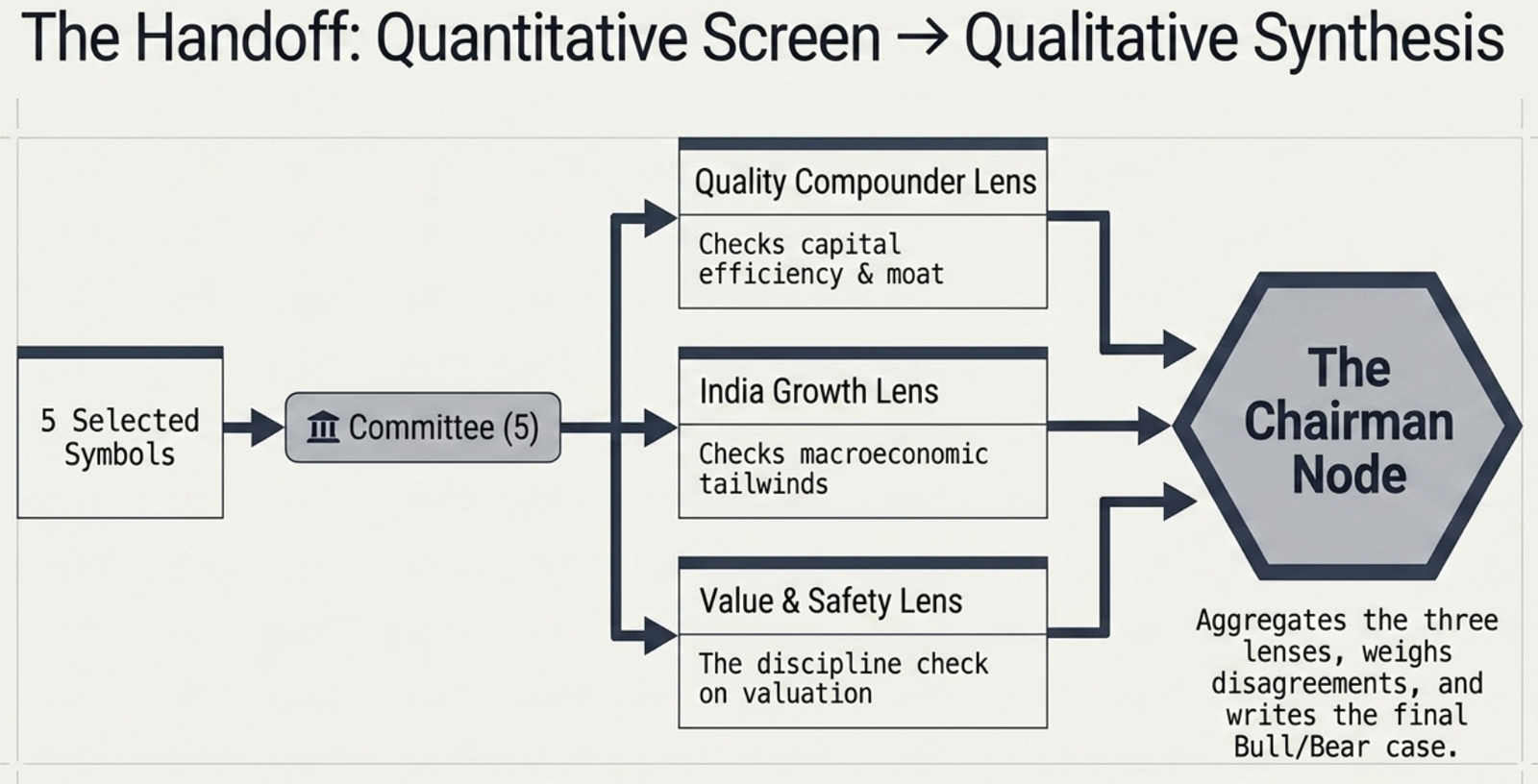
What the Investment Committee Adds
The Screener surfaces stocks that pass quantitative filters. The Investment Committee then answers the qualitative question — which of these is actually worth your attention and in what order?
| Screener | Investment Committee | |
|---|---|---|
| What it does | Filters 6,000+ stocks by ratio thresholds | Evaluates 1–5 specific stocks through 3 analytical lenses |
| Output | Ranked list of stocks that meet your criteria | Per-stock scores, chairman research stance (Watch / Investigate / Avoid), illustrative allocation |
| AI required | Optional (NL screener uses BYO key) | Required for Deep Dive — uses your BYO key |
| Best used for | Finding candidates across the universe | Deciding between a shortlist of 2–5 candidates |
Related Guides
Ready to Analyse Indian Stocks Like a Pro?
Finmagine gives you 30+ computed financial ratios, sector benchmarks, FII/DII flows, the Finmagine Score, and AI-powered analysis — all in one place.