Following along? Open the live page
Finmagine — free to explore • premium for full access • no app needed
The short answer
/account/ai-keys.php has two completely independent sections that are easy to mix up:
- AI Provider Keys — your own LLM key (Claude, GPT, Gemini, Groq, DeepSeek, or OpenRouter). This is what every ▶ Run with my AI button across Finmagine actually uses — Investment Committee, Research Presets, and anything else that needs an LLM call. Finmagine never pays for or sees your usage bill.
- Data Source Keys — currently just Alpha Vantage. Not an LLM at all — it's a market/news data key used for exactly one thing: the News & Sentiment context inside Investment Committee for US stocks.
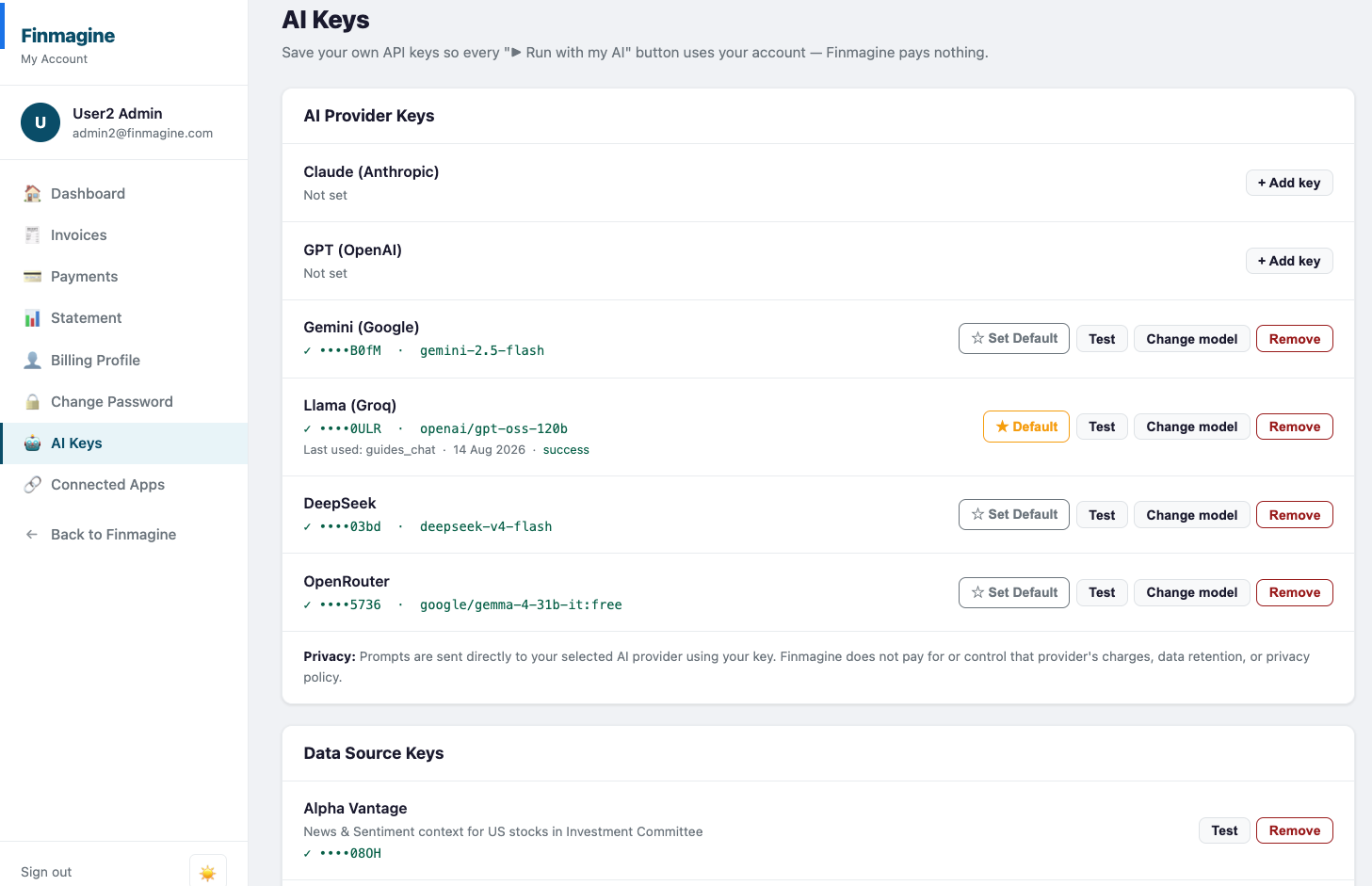
AI Provider Keys — button by button
Six providers are listed, whether or not you've saved a key for them yet: Claude (Anthropic), GPT (OpenAI), Gemini (Google), Llama (Groq), DeepSeek, and OpenRouter. Each is completely independent — you can save as many or as few as you want.
| Button / status | What it actually does |
|---|---|
| Not set / + Add key | No key saved yet for this provider. Clicking opens a form for the raw key (with a show/hide toggle) and an optional model override — leave the model blank to use that provider's default. |
| ☆ Set Default / ★ Default | Marks this provider as the one used whenever a feature doesn't ask you to pick explicitly. Only one provider can be the default at a time — setting a new one un-sets the old one automatically. |
| Test | A real, live call to your saved provider — not a fake ping. Reports ✓ Working on success, ✓ Key valid · free model rate-limited if the key itself is fine but a free-tier model got throttled, or a specific ✗ error otherwise. |
| Change model | Swap which specific model of that provider gets used (e.g. gemini-2.5-flash vs. a newer Gemini release). Where Finmagine has a live, regularly-refreshed model list for that provider, you get a dropdown; otherwise it's free text. |
| Remove | Deletes the saved key after a confirmation prompt. If it was your default, nothing else automatically becomes the new default. |
Data Source Keys — Alpha Vantage, and why it's different
The second card on the page looks similar but serves a completely different purpose. Alpha Vantage isn't an LLM provider — it's a market-data vendor, and the only thing your key here powers is News & Sentiment context for US stocks inside Investment Committee. There's no Set Default or Change model button here, because there's no model choice to make — just Test and Remove.
The shared-cache detail worth knowing
Straight from the page's own explanation: "To keep it fast and cost-efficient, sentiment data fetched using your key is cached and may be shown to other Finmagine users researching the same stock — and you may likewise see results another user's key already funded."
In plain terms: if you and another user both run Investment Committee on the same US stock around the same time, whichever of you asked first pays the one Alpha Vantage API call, and the other gets the cached result for free. Your raw key is never shared or visible to anyone else — only the resulting sentiment data (which is about a public stock, not about you) gets reused. It's a cost-sharing mechanism, not a privacy gap.
How this relates to the developer BYO API guide
If you've read BYO LLM Key Management via API, this page is the exact same underlying system — save, test, remove, and set-preferred — just as a point-and-click UI instead of REST calls you write yourself. Everything that guide documents about encryption, header-only auth, and audit logging applies here too; you're just clicking buttons instead of sending requests. Most people should use this page. Reach for the REST endpoints directly only if you're building your own tool or automation on top of Finmagine's API.
Quick reference
Ready to Analyse Indian Stocks Like a Pro?
Finmagine gives you 30+ computed financial ratios, sector benchmarks, FII/DII flows, the Finmagine Score, and AI-powered analysis — all in one place.